Audio
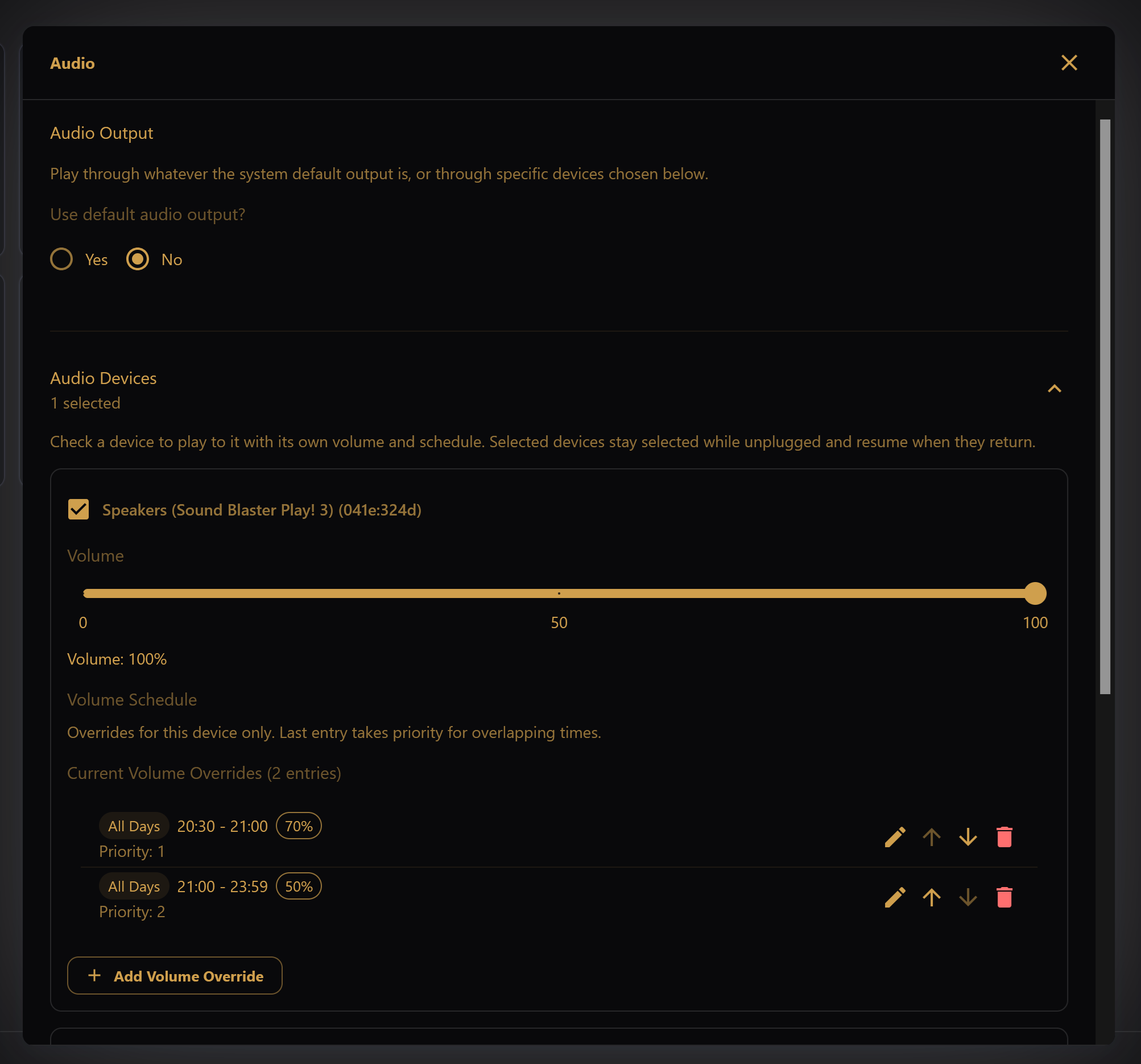
Audio Output
Use default audio output? chooses how the desktop player reaches your speakers.
- Yes plays through whatever the operating system's default output is at the time. Change the default in the OS and the player follows. Volume Control applies to this output.
- No plays only through the devices you check under Audio Devices. Each device has its own volume and volume schedule. This allows, for example, sending audio straight to the FM transmitter, applying a volume schedule to the patio speakers, and not sending any audio to the USB headset.
Checked devices stay selected while unplugged (they show as Not connected) and resume automatically when they return. Select a device while it is connected.
Volume
Volume levels and schedule overrides are documented under Advanced → Volume.
Loudness Normalization
If set, all songs added will have loudness normalization applied by default. By normalizing audio, overall volume level will be consistent across songs, and audio will play well on FM radio, outdoor speakers, phones, etc.
Audio Sync Adjust
Fine-tune how audio lines up with the light sequence. The slider runs from −100 ms to +100 ms:
- Negative values play audio slightly earlier.
- Positive values play audio slightly later.
Use this if lights and sound are consistently ahead or behind each other on your setup.